Lockout Tagout Software Features
Build OSHA-compliant LOTO procedures in minutes. Track inspections, manage training, and keep every facility audit-ready from one account.
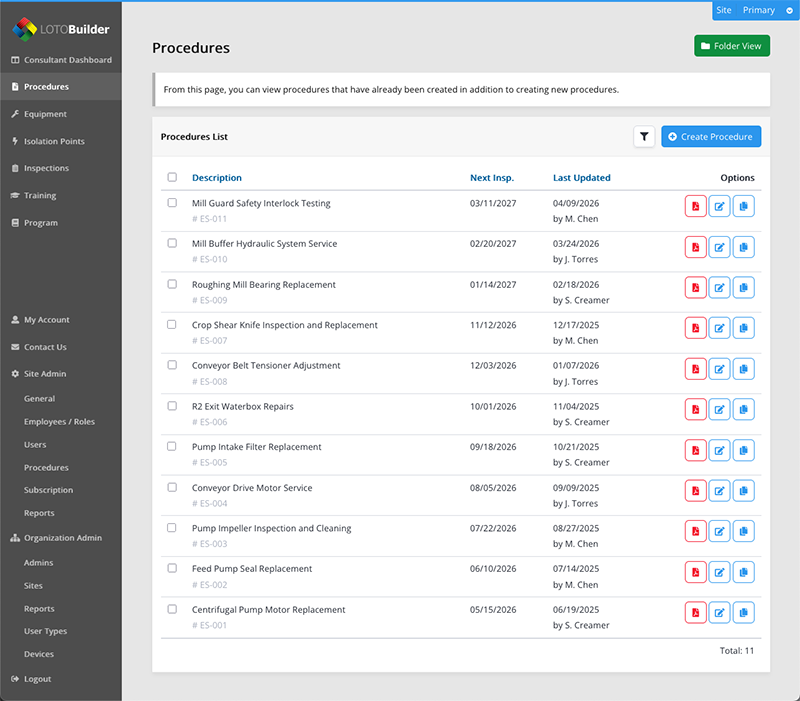
Procedure Builder
Create detailed energy control procedures with a guided, step-by-step workflow. Define equipment, map energy sources, specify isolation points with locations and methods, and generate professional PDF procedures ready for the shop floor.
- Step-by-step isolation point mapping with energy source classification
- Professional PDF output with equipment details, steps, and required hardware
- Customizable deenergize and reenergize sequences
- Multi-language procedure support
- Procedure duplication for fast variations of similar equipment
- Version history tracking with user attribution
- Format and layout customization
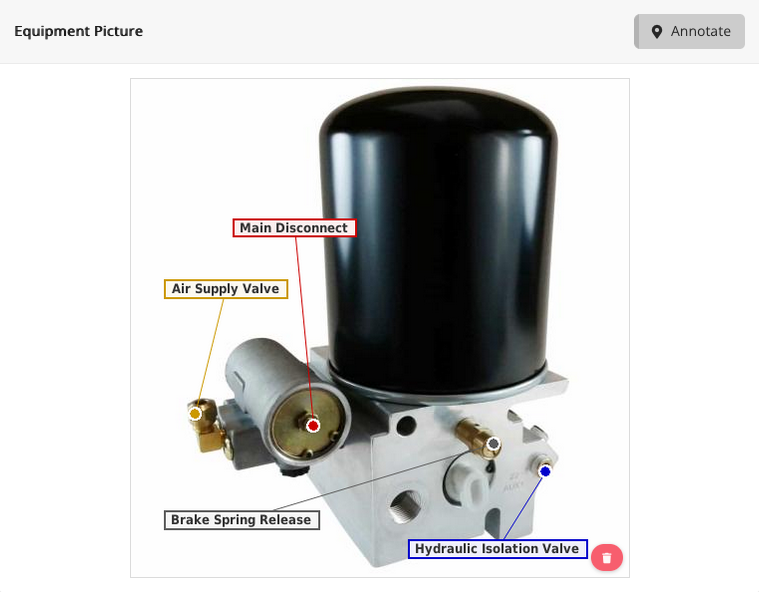
Visual Procedures & Equipment Photos
Workers can see exactly where to apply locks and tags instead of relying on text descriptions alone. Upload equipment photos and add precise callout annotations pointing to each energy isolating device.
- Upload equipment photos with interactive callout annotations
- Isolation point images with precise arrow indicators
- Annotations composited directly into printed PDFs
- Centralized equipment registry with asset tags, locations, and photos
- Equipment and isolation point duplication with cascading annotations
- Image cropping and rotation tools
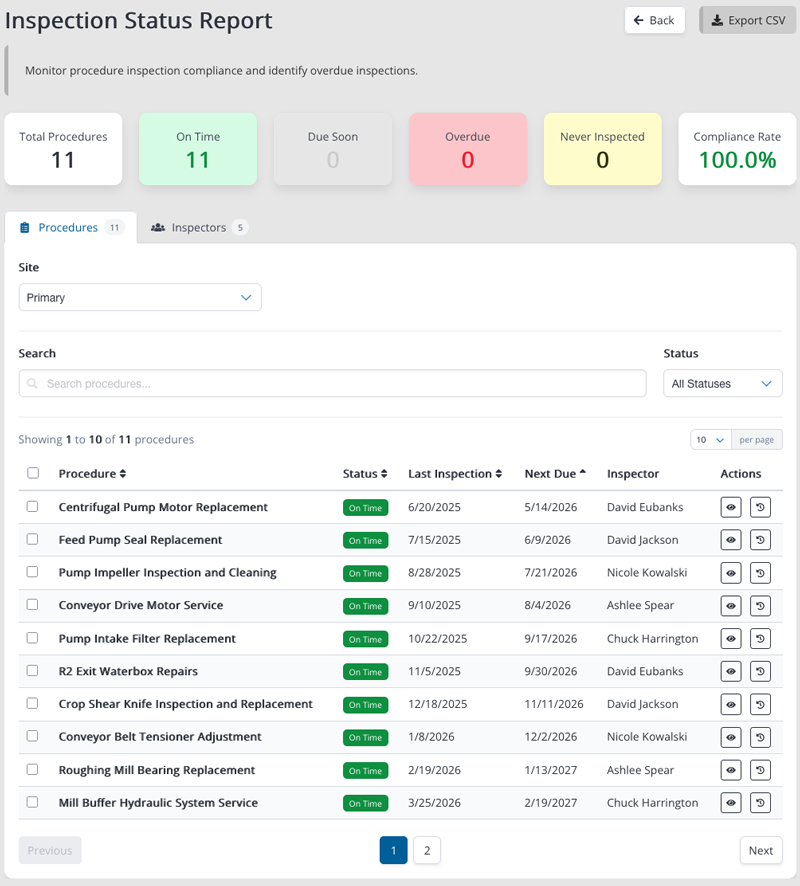
Inspection Tracking & Reporting
OSHA 1910.147(c)(6) requires a periodic inspection of every energy control procedure at least annually. LOTOBuilder ensures no deadline is missed and every inspection is properly certified.
- Automatic email reminders before inspection deadlines
- Inspection PDF certificates with all OSHA-required fields
- Compliance dashboard: on-time, overdue, due-soon, never-inspected
- Inspector performance analytics
- Full inspection history per procedure
- Attach supporting photos, documents, and notes
- CSV export for reporting and audits
Multi-Site Management
Manage all your organization's facilities from one account. Each location maintains its own procedures, equipment, and employees while sharing centralized administration and reporting.
- Separate procedures, equipment, and employees per site
- Four user roles: Standard, Read-Only, Site Admin, Organization Admin
- Assign users to specific sites with role customization
- Cross-site access control (restrict or allow visibility)
- Organization-level inspection reports across all sites
- Bulk user import via CSV
Everything Else You Need
Built-in tools for every part of your LOTO program.
Training Records
Track training sessions for authorized and affected employees. Record attendance, attach materials, and maintain OSHA-required certifications with names and dates.
Employee Database
Manage employee profiles with name, title, email, and photo. Assign roles and site access from one place. Bulk import users via CSV.
Energy Source Library
Pre-configured energy types (electrical, mechanical, hydraulic, pneumatic, chemical, thermal, gravity) with the ability to add custom sources for your facility.
Search & Organization
Custom folders for procedures and equipment. Search by name, equipment, energy type, or keyword. Filter and sort to find any procedure instantly.
Bulk Operations
Move procedures between sites with cascading equipment updates. Duplicate procedures and equipment to create variations fast. Import users in batch.
Program Documentation
Generate your overall energy control program document. Upload legacy paper procedures for reference during your transition to digital.
Reporting
Site admin inspection reports with compliance statistics. Organization-wide dashboards. CSV exports for any dataset. Audit-ready documentation on demand.
Guided Onboarding
Step-by-step Getting Started wizard walks you through site setup, employee entry, equipment inventory, and building your first procedure.
Soft Delete & Recovery
Accidentally delete a procedure? Restore it with full data intact. View and recover any deleted procedure from the admin panel.
Start Building OSHA-Compliant Procedures Today
30-day free trial with full access to every feature. No credit card required.
Start Free Trial$97/user/year Standard · $17/user/year Read-Only · See pricing